


SoloPro - Offline Player
4.8443.00 Reviews
App Specs
- Version
- 1.3.4
- Updated On
- License
- Free
- Downloads
- 1,000,000+
- Developer
- TingCoco Player
- Categories
- Entertainment
- Platform
- Android
Screenshots
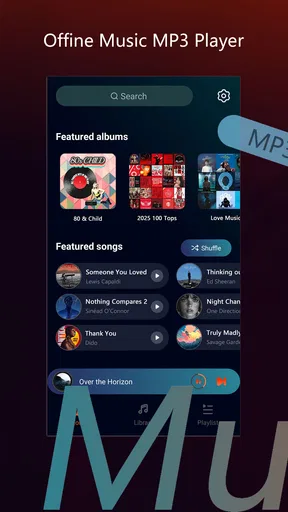
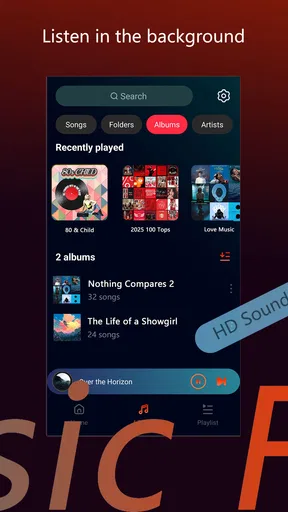
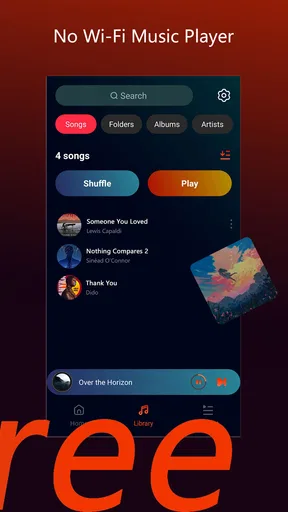
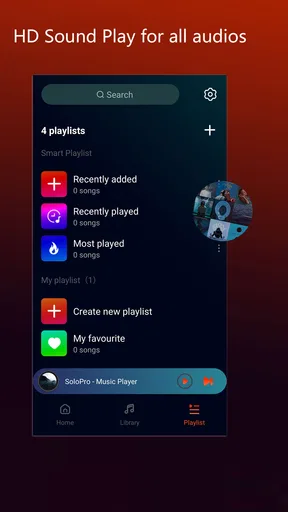
 Analysis by AppCompare
I approached SoloPro - Offline Player as an entertainment app for the moments when I want something simple, private-feeling, and less dependent on a constant connection. Its store presence is deliberately brief, so the real question is not whether the app sounds exciting on paper, but whether its focused offline-player identity fits the way you actually consume entertainment. After spending time with it, my impression is that its appeal comes from reducing the usual distractions around playback rather than trying to become an all-purpose media platform.
That narrow purpose can be a strength. I do not have to approach it like a social network, a discovery service, or a complicated production tool. I can open it, work through the available controls, and concentrate on the content itself. At the same time, anyone expecting a large catalog, community features, or a highly elaborate interface should set expectations differently. This is best considered a compact player experience, not a replacement for every entertainment app on a phone.
How SoloPro feels to use in everyday situations
I find SoloPro most useful when I treat offline playback as a small bit of preparation rather than something to figure out on the move. A quick check beforehand can help me avoid discovering a snag when I’m tired, distracted, or out of signal. That practical routine also makes it easier to judge whether the player fits my habits before I rely on it for a longer outing.
Readability and navigation come first
The first thing I value in an offline player is whether I can understand the main path without stopping to decode the interface. SoloPro benefits from having a clear central purpose: the user is there to play something, manage the current session, and return when finished. That is easier to approach than an entertainment app packed with recommendations, comments, advertising panels, and several competing sections.
For someone who prefers a calmer screen, this focused structure may be more comfortable. I find that fewer competing destinations make it easier to remember where I am, especially when I am using the app briefly rather than settling in for a long session. The experience is also more approachable for a person who is not confident with complex mobile software, because the basic idea does not require learning a large ecosystem around the player.
Still, simplicity should not be confused with perfect clarity. A player can feel straightforward while individual controls remain easy to overlook, particularly for people who enlarge text, use a smaller display, or rely on visual distinction between buttons. My practical advice is to spend a few minutes exploring the playback screen before depending on it in a rushed situation. That small test tells you whether the control placement and visual hierarchy work for your eyes and habits.
I also like to judge navigation by interruption recovery. If I pause an activity, move to another task, and return later, the important question is whether I can immediately identify the current state. This matters more than a polished first impression. An app used during commuting, travel, or household work needs to be understandable after a distraction, not only when I am looking at it with full attention.
Worth Reading Before You Choose

EA SPORTS FC Mobile 26 Is a Bigger Football Game, but It Takes Time

Flipboard Shows What News Apps Must Do Beyond the Feed

Switching to Android Auto Means Rethinking Your Driving Routine

Google Calendar Makes a Crowded Week Easier to Manage

Ludo King Makes the Most of the Minutes Between Plans

Baby Panda World Brings Quick Play to Modern Phones, but Its Game Library Feels Busy
The developer, TingCoco Player, has positioned this as an entertainment product rather than a specialist accessibility tool. I therefore would not assume that every accessibility preference on a phone automatically produces an ideal experience inside the app. System-level adjustments can help, but the result depends on how the player’s own controls respond to those settings.
Motor and sensory considerations in real use
SoloPro is most comfortable for me when I can use deliberate taps instead of repeated, precise gestures. That distinction is important for people with tremors, limited dexterity, joint pain, or temporary hand strain. A player that asks for fewer actions is naturally easier to manage than one that requires constant swiping through menus, although the usefulness of that advantage depends on the size and spacing of the controls on your particular device.
If tapping small targets is difficult, I would test the main actions with the phone held in the position I normally use. A control that seems reachable while sitting at a desk may be awkward when the device is held in one hand. This is one of the less obvious trade-offs of a compact entertainment app: fewer visible controls can reduce clutter, but it can also make each control more important and potentially harder to hit if the layout is tight.
For users with low vision, the best approach is to check the app with the phone’s preferred display settings before committing to it. Enlarged system text, stronger contrast, and a larger display may improve the experience, but I would not promise that every element scales equally. The same applies to color sensitivity. If you have difficulty distinguishing subtle shades, rely on labels and familiar control shapes rather than color alone whenever possible.
People who are sensitive to motion or visual activity should pay attention to how the player behaves during transitions and playback. I would use it in a quiet setting first, with brightness and volume adjusted conservatively. That is not a criticism unique to this app; it is a sensible check for any entertainment player. The important point is that offline access does not automatically make an experience sensory-friendly. Content, screen behavior, and the surrounding environment still matter.
Audio access is equally personal. Some users need captions, transcripts, amplification, or visual alternatives to understand entertainment comfortably. I would not choose SoloPro solely on the assumption that an offline player includes those tools. If those functions are essential rather than optional, an established media app with clearly documented support for your requirements may be the safer choice. SoloPro makes more sense when its basic playback approach already matches what you need.
Why offline access changes the situation
The most useful context for this app is a place where connectivity is unreliable, expensive, distracting, or unavailable. I can imagine preparing entertainment before a flight, saving something for a long train journey, or using a phone in a building where reception drops. In those situations, an offline player removes one common source of frustration: waiting for a service to reconnect at the exact moment I want to listen or watch.
There is also a concentration benefit. Online entertainment services often pull me toward recommendations, notifications, trending sections, and account-related prompts. A focused offline tool can create a more predictable routine. For a child using a device under supervision, a traveler trying to limit data use, or an adult who wants fewer online distractions, that difference is meaningful even when the player itself remains simple.
Here is the everyday scenario in which I see the clearest value. Before leaving home for a long day, I would prepare the material I expect to use, open SoloPro once to make sure the player behaves as expected, and then keep the phone in a low-interaction role during the journey. If I were helping someone who finds last-minute technical changes stressful, I would do that check with them in advance rather than handing over the phone at the station or airport.
That preparation step is more important than it sounds. Offline tools reward planning. They are less suitable for someone who wants unlimited discovery at the moment of use, because the experience depends on having the right material ready beforehand. The trade-off is clear: fewer connection problems and interruptions in exchange for less spontaneity.
The app is free to download, which makes that experiment easy for most people. It also carries an Everyone content rating, so its general positioning is broad rather than aimed at a narrow adult audience. I would still supervise younger users according to the material they access, because an age label for the app does not determine the suitability of every piece of entertainment a person may use with it.
Where the experience still has barriers
My main reservation is that a focused player can leave important questions unanswered for users with specific needs. People often want to know how well an app handles large text, screen readers, captions, alternative input, audio balance, or reduced-motion preferences. Unless those details are obvious during your own test, I would avoid treating SoloPro as a guaranteed solution for any one accessibility requirement.
That does not make it unusable. It means the decision should be personal and practical. If you can open the app, identify the essential controls, and complete a short playback session without strain, its simplicity may work in your favor. If you need a carefully documented accessibility feature set, a more established alternative may offer greater confidence even if it feels busier.
There can also be barriers around memory and routine. Offline use is convenient only after preparation, and preparation creates another step to remember. Someone with cognitive fatigue may appreciate the reduced online clutter but dislike having to organize content ahead of time. I would build a small routine: check the material, start a short test, and leave the app ready before the situation becomes demanding. That workflow reduces the need for troubleshooting under pressure.
Another limitation is that “offline” should not be interpreted as “works for every media need without conditions.” The app’s value depends on what you intend to play and how you expect to obtain or organize it. If your priority is live content, automatic recommendations, shared playlists, or a broad cloud library, a mainstream streaming service will probably be more convenient. SoloPro is better when control, preparation, and reduced dependence on a connection matter more than constant discovery.
I would also keep an eye on the cost boundary. The app is free, but optional in-app purchases range from a few dollars to amounts approaching twenty dollars per item. That does not automatically make it poor value, yet I would inspect each purchase carefully before paying. For a user who only needs basic offline playback, the free starting point may be enough. For a household trying to avoid unexpected spending, it is sensible to establish a clear rule about purchases before handing over the phone.
Who should use it and who should choose something else
I think SoloPro is a good fit for people who want a straightforward offline entertainment player, especially when unreliable connectivity is part of their normal routine. It may suit travelers, listeners in low-signal areas, people trying to reduce online distractions, and users who prefer a smaller, more focused experience than a full streaming platform.
It is also worth considering if you support someone who becomes overwhelmed by crowded interfaces. A limited-purpose player can be easier to teach than an app filled with recommendations and social functions. I would introduce it through one repeatable sequence rather than explaining every possible option: open the app, choose the intended item, start playback, pause when needed, and return later. That kind of consistent workflow can be more valuable than a long list of features.
I would skip it if your priority is a huge online catalog, collaborative listening, sophisticated discovery, or guaranteed support for a particular assistive technology. In those cases, the usual alternatives may justify their extra complexity. A streaming platform is the better choice for instant access to broad content, while a player with detailed accessibility documentation is preferable when captions, screen-reader behavior, or specialized controls are non-negotiable.
Its current version is 1.3.4, and the app has already reached over a million installs. The average rating is 4.8 from roughly twelve thousand ratings, with hundreds of written reviews. Those figures suggest that many users find the overall concept appealing, but they do not replace a personal accessibility check. Ratings usually describe general satisfaction; they rarely explain whether an interface works for a particular vision, hearing, motor, or cognitive profile.
My inclusive verdict after testing the concept
SoloPro - Offline Player succeeds when I treat it as a focused tool rather than a complete entertainment ecosystem. Its strongest quality is the way offline use can make a planned session more predictable: fewer connection worries, fewer online distractions, and a simpler path to playback. That can support different contexts, including travel, limited connectivity, and users who prefer less visual and functional clutter.
Its inclusive value is more conditional. The straightforward purpose may help people who find busy apps tiring, and a prepared offline workflow can reduce pressure in situations where network access is uncertain. However, I would not recommend it blindly to someone who depends on a specific accessibility feature. The right test is concrete: can you locate the key controls, operate them comfortably, understand the playback state, and recover from an interruption using your normal phone settings?
For me, the decision comes down to priorities. Choose SoloPro if dependable offline playback and a focused entertainment routine matter more than discovery and advanced platform features. Try an alternative first if your needs center on documented accessibility support, live services, shared content, or a large always-available library. Since the app is free to start and rated for Everyone, it is easy to evaluate without committing immediately, but I would still review optional purchases carefully.
My recommendation is therefore positive but specific: use it as a prepared, low-distraction player, not as a universal replacement for every entertainment service. If that role matches your day-to-day needs, its simplicity can be genuinely useful. If your access requirements are precise or your entertainment habits are highly online, another app may serve you better.
Pros
- Works without an internet connection once songs are stored locally.
- Supports background playback while using other apps.
- Simple interface makes browsing local music quick and easy.
- No account or streaming subscription is required for offline listening.
- Uses local files
- helping avoid mobile data consumption.
Cons
- It cannot provide music unless compatible audio files are already on your device.
- Features may feel limited compared with full streaming services.
- Downloaded files may need manual organization and transfer.
- Audio quality depends on the original files and device hardware.
- Availability of advanced playback tools may vary by platform.
FAQs for SoloPro - Offline Player
What is SoloPro - Offline Player?
SoloPro - Offline Player is designed for listening to music and other supported audio files without relying on a continuous internet connection. After adding compatible tracks to your device, you can browse your personal library, create playlists, and enjoy playback while traveling, commuting, or using an area with weak reception. It is primarily a local media player rather than a streaming service or music-download platform.
Can I use SoloPro - Offline Player without an internet connection?
Yes, offline playback is the main reason to use SoloPro. Once your audio files are already stored on your Android or iOS device and the app has permission to access them, playback should work without mobile data or Wi-Fi. Internet access may still be required for downloading the app, viewing store information, or using any optional online features that may be included in a particular version.
How do I add music or audio files to SoloPro?
SoloPro generally plays files that are already available on your device or imported through the system file-sharing options. Depending on your platform and the app version, you may be able to select folders, import individual tracks, or transfer files from a computer and then refresh the library. It is worth checking the supported formats and storage permissions before moving a large collection.
Does SoloPro - Offline Player support playlists and background playback?
The app is intended to make personal audio collections easier to manage, so common player functions such as queue control, playlist organization, repeat, shuffle, and background listening may be available. However, exact tools can differ between Android and iOS releases. Before downloading, review the current store description if a specific feature—such as lock-screen controls, equalizer settings, or gapless playback—is essential to you.
Is SoloPro - Offline Player free, and are there any limitations?
The download and basic playback experience may be free, but availability of advertisements, premium features, in-app purchases, or platform-specific restrictions depends on the current edition. SoloPro should not automatically be considered a source of free copyrighted music; users are responsible for obtaining audio legally. Also review the app’s permissions and privacy information so you understand what data and device access are requested.


